ChildFriendly Pricing Explained in Under 2 Minutes
This document explains how ChildFriendly pricing works, including plans, per-transaction fees, fee pass-through options, and how to get started. It uses a simple $400 invoice example to show exactly what you and parents pay in different scenarios.
Last updated 3 months ago
Free Lite Plan
Every center begins on the Lite plan at no cost. There are no subscriptions and no monthly charges and you unlock all of ChildFriendly's Modules.
Activate Online Payments
There continue to be no subscriptions or monthly fees when you activate online payment. You simply pay a merchant fee per transaction processed—and the best part? You can pass that fee on to your families as a convenience fee, giving you access to our entire software platform at zero cost
$400 Invoice Example
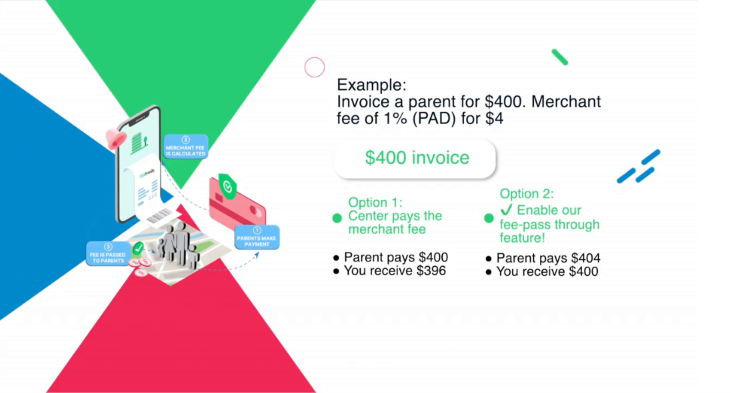
Consider an example where you send a $400 invoice. This is the amount you want to receive as your payout. From here, you can choose how transaction fees are managed.
Choose Option 1 – You Cover the Fee
With Option 1, your center absorbs the processing fee:
The parent pays $400.
A 1% PAD processing fee of $4 is deducted from your payout.
You receive $396.
This option keeps the parent’s payment amount simple and unchanged while you take on the cost of processing.
Choose Option 2 – Enable Automatic Fee Pass-Through
With Option 2, you enable ChildFriendly’s automatic fee pass-through feature so the parent covers the processing fee.
In this case:
The system automatically adds the $4 processing fee to the total.
The parent pays $404.
You still receive the full $400.
No manual math or configuration is required—ChildFriendly calculates and applies the fee for you.
Returned Payment Fee Handling
If a payment is returned (for example, due to non-sufficient funds or incorrect account information), a $40 returned payment fee applies. You can configure the system to automatically pass this fee to the parent as well, so your center is not out of pocket for failed payments.
Was this helpful?
Still need help? Ask the team